
Independent open-source project · Not an official Vercel product
Desktop control center for Eve agents
Build, deploy and operate
every Eve agent, without the terminal.
Eve Studio is a native macOS app to run, chat with, build, wire up, and deploy your Eve agents. Create an agent, connect Vercel, and go. It provisions everything for you.
macOS · Apple silicon · free & open source
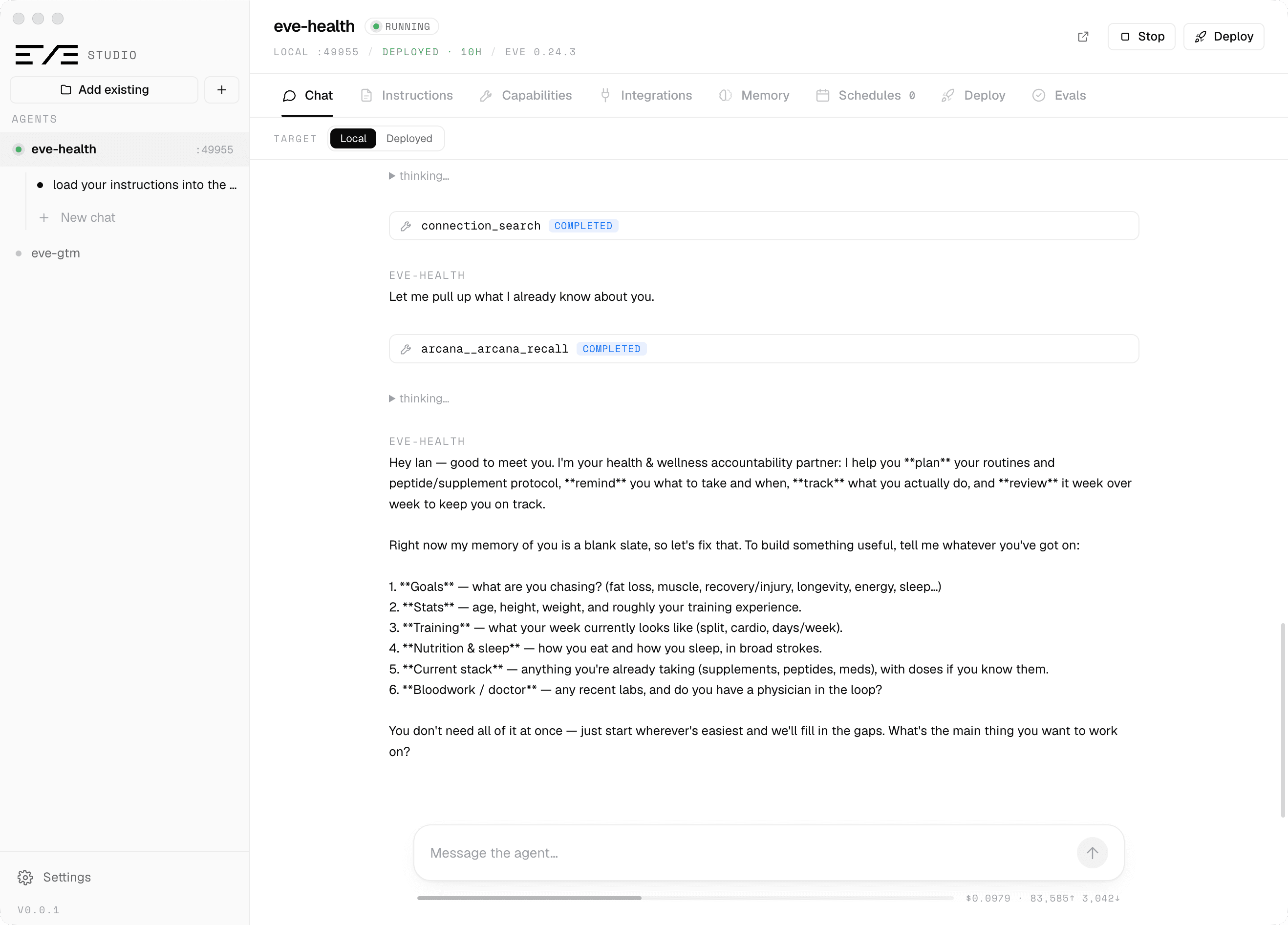
Long-term memory
An agent that remembers across sessions, channels, and deploys.
Eve gives every agent durable sessions and memory slots. Kybernesis Arcana, an official eve integration, adds a workspace-scoped brain with recall, storage, and notes. Eve Studio wires all of it in a couple of clicks and lets you look inside.
01
Arcana, the official way
Paste a key and pick a workspace. Studio validates it, installs the extension with eve add extension/arcana, and sets the env vars locally and on Vercel. The mount brings its own recall, remember, and brain-note skills and always-on memory instructions.
02
Memory slots, built into Eve
Add a file-memory slot for durable facts per caller, or install Supermemory from the registry. Sessions, compaction, and durable state are there from the start; Chat exposes Compact and Clear.
03
Browse the brain
Stats, a timeline of what the agent remembered (in Studio, on Slack, on a schedule), and search, reading the same workspace the agent writes. Give a subagent its own brain with a separate mount.
Add any integration from the eve registry. Arcana is one of many official items. Studio's Integrations tab lists the whole catalog (channels, connections, extensions, memory providers, instrumentation) with search and one-click install through eve add. Guided wizards stay for Slack, Discord, Telegram, Teams, Twilio, GitHub, Linear, and Buzz. How memory works →
Everything, in one window
One app for the whole agent lifecycle.
Chat, local & deployed
Stream your agent's turns, tool calls, subagent delegations, and approvals. Cancel a turn, compact or clear context, or reset the session. Talk to the local dev server or your production deployment from the same window.
Every capability, editable
Browse tools, skills, subagents, and hooks, then open, edit, and delete their source in-app. Instructions, model (via eve set), connections, channels, and schedules too. Flip on Eve's self-modification subagent when you want the agent to edit itself.
Long-term memory
Kybernesis Arcana is an official eve integration. Studio installs it as an extension, wires the key locally and on Vercel, and opens a brain browser. Eve's own memory slots (file memory or Supermemory) sit alongside it.
Registry integrations
Browse the official eve registry in-app (channels, connections, extensions, memory providers, instrumentation) and install any of it with eve add. Guided wizards remain for Slack, Discord, Telegram, Teams, Twilio, GitHub, Linear, and Buzz.
One-click Vercel deploy
Link the project, pull the AI Gateway token, and ship to production with eve deploy without leaving the app. Team picker, env, secrets, and logs included.
Terminal-free onboarding
Provisions Node 24, installs Eve, and signs you into Vercel automatically. A non-technical operator never has to open a terminal. Ever.
Channels, including Buzz
Put the agent in Slack, Discord, Teams, Telegram, or Twilio, or give it its own identity in Buzz, Block's agent-native team chat, with a bridge that keeps listening while Studio is closed.
Schedules & evals
Author cron-driven jobs that wake the agent on Vercel Cron, and run the agent's eval suite against a live model, from their own tabs.
New to Eve?
Built on Eve, the framework for agents.
An Eve agent is a folder. Eve gives it a durable runtime, tools, subagents, and memory, then surfaces it across channels, all managed on Vercel. Eve Studio is the app for operating it.
Runtime
Durable execution, state persistence, event streaming.
Durable Workflow
Checkpointed steps, park between messages, resume on delivery.
AI SDK
Model calls, streaming.
Vercel Sandbox SDK
Isolated code execution.
Connection SDK
MCP / HTTP endpoints.
Tools & Subagents
Typed functions and child agents.
Channel
Where your agent gets surfaced.
Chat & webhooks
Fully managed via Vercel: sandboxes, durable workflows, model routing, and observability handled for you.
No terminal, ever
From download to a deployed agent.
A first-time user never touches a command line. The app provisions its own Node runtime, installs Eve on first use, and walks Vercel sign-in.
Install
Download the signed, notarized app. Opens with no Gatekeeper warning.
Create an agent
The app provisions a Node runtime and scaffolds a fresh Eve agent.
Connect Vercel
Sign in and link. The AI Gateway token is pulled for you.
Chat & ship
Talk to your agent, edit its capabilities, and deploy to production.